
Chrome Volume Booster Download: Amplify Your Audio to 600%

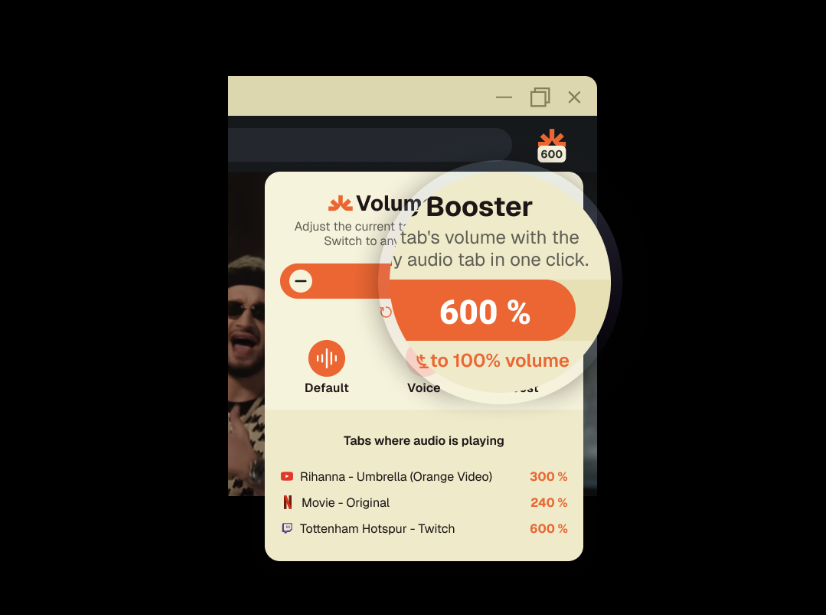
General users, have you ever cranked up your Chrome browser’s volume, only to find your favorite podcast or movie still sounds like a distant whisper? It’s like trying to hear a song through a storm. The Volume Booster extension, available for chrome volume booster download at Volume Booster, is your ticket to louder, clearer audio, boosting sound by up to 600%. With volume boost up to 600%, bass enhancer, and tab-specific volume control, this sound booster extension transforms your Chrome audio experience for streaming, gaming, or virtual meetings. Ready to make every sound vibrant? Let’s explore why Volume Booster is the ultimate chrome audio amplifier, guide you through its quick setup, and share tips to maximize your audio. Download it today and turn up the volume!
The Struggle with Quiet Browser Audio
You’re watching a YouTube tutorial, but the instructor’s voice is barely audible. Or you’re streaming music on Spotify, and even at max volume, it lacks punch. Chrome’s built-in audio controls often fall short, leaving you adjusting system settings or leaning closer to your speakers. This is where Volume Booster, a top-tier louder audio plugin, comes in. By amplifying audio across tabs with chrome audio boost, it delivers a powerful, seamless listening experience for general users, whether you’re binging Netflix, joining Zoom calls, or gaming online.
Why Volume Booster Stands Out
For general users, Volume Booster is the go-to volume booster for its simplicity and power. Available for chrome volume booster download, it’s designed to enhance audio without requiring technical know-how. Here’s why it’s a must-have for Chrome users.
Massive 600% Volume Boost
With volume maximizer, amplify audio up to 600%, making faint videos, music, or calls loud and clear, perfect for any Chrome tab.
Bass Enhancer for Immersive Sound
The bass enhancer adds depth, ideal for music enthusiasts or movie buffs craving a theater-like experience.
Tab-Specific Volume Control
With tab volume control, adjust audio for individual tabs, balancing sound across YouTube, Spotify, or Zoom without overlap.
Inside Volume Booster’s Features
Available at Volume Booster, Volume Booster is an intuitive audio enhancer chrome tool that makes audio amplification effortless. Let’s break down its core features for general users.
Up to 600% Volume Boost
Amplify sound by up to 600%, ensuring every podcast, video, or call is audible, even on low-volume devices or headphones.
Bass Enhancer for Rich Audio
Boost low frequencies with the bass enhancer, enhancing music on Spotify or sound effects in games for a fuller experience.
Tab-Specific Volume Control
Manage audio per tab with tab volume control, perfect for multitasking users juggling music, videos, and calls.
Easy-to-Use Slider
Adjust volume with a simple slider, making it accessible for all users, no tech skills required.
Chrome Compatibility
Works flawlessly on Chrome for Windows, Mac, or Linux, delivering consistent chrome audio boost across platforms.
Real-Time Audio Adjustments
Tweak volume instantly without reloading tabs, ensuring a smooth, uninterrupted listening experience.
How to Choose the Right Volume Booster
With many sound booster extensions available, here’s how to pick the best one for your chrome volume booster download.
Step 1: Prioritize Key Features
Look for volume boost up to 600%, bass enhancer, and tab volume control to ensure versatile audio enhancement.
Step 2: Confirm Chrome Support
Volume Booster is optimized for Chrome, available via the Chrome Web Store or Volume Booster.
Step 3: Check User Feedback
Read reviews on the Chrome Web Store or Volume Booster to verify performance for audio enhancer chrome tasks. Users praise its simplicity and effectiveness for amplifying audio.
Step 4: Opt for Free Tools
Volume Booster offers a robust free version, ideal for general users seeking cost-effective audio solutions.
Step 5: Ensure Security
Choose trusted extensions like Volume Booster with minimal permissions to keep your browsing safe.
How to Download and Set Up Volume Booster
Ready to amplify your Chrome audio? Here’s how to get Volume Booster with a chrome volume booster download and start boosting sound in minutes.
Step 1: Download and Install
- Open Chrome.
- Visit Volume Booster or the Chrome Web Store.
- Click “Add to Chrome” and pin the extension to your toolbar.
Step 2: Open Your Audio Source
Load a tab with audio, such as a YouTube video, Spotify track, or Zoom call.
Step 3: Boost Your Audio
- Click the Volume Booster icon.
- Slide the volume up to 600% for simple volume boost.
- Enable the bass enhancer for richer sound.
- Use tab volume control to adjust specific tabs if multitasking.
Step 4: Test and Optimize
Play your audio and tweak the slider to balance volume and bass for optimal clarity.
Step 5: Enjoy Louder Audio
Experience amplified, vibrant sound across your Chrome tabs, from music to meetings.
Real-Life Audio Wins with Volume Booster
Imagine watching a low-volume TED Talk on YouTube. Volume Booster boosts the audio to 500%, making every word crystal-clear, while the bass enhancer adds warmth to the speaker’s voice. Or you’re juggling a Twitch stream and a Google Meet call — tab volume control lets you amplify the stream without overpowering your meeting. Gamers can enhance subtle sounds, like enemy movements in Call of Duty, with volume maximizer, giving a competitive edge. General users, from students to remote workers, benefit from louder, clearer audio across all their Chrome activities.
Audio Hacks for General Users
Maximize your chrome volume booster download with these practical tips.
- Start Gradually: Begin with a 200–300% boost to avoid distortion, especially with budget earphones or speakers.
- Balance Bass: Use the bass enhancer for music or movies, but reduce it for clear dialogue in calls or tutorials.
- Tab-by-Tab Control: Leverage tab volume control to prioritize audio, like boosting a lecture while muting background music.
- Test Across Platforms: Experiment with Volume Booster on YouTube, Netflix, and Spotify to find the best settings for each.
- Protect Your Speakers: Avoid prolonged 600% boosts to prevent crackling or damage to small speakers or earphones, as high volumes can strain hardware.
Integrating Volume Booster into Your Chrome Workflow
Volume Booster seamlessly enhances your Chrome experience, boosting audio for streaming, work, or gaming. Pair it with platforms like Netflix, Zoom, or Twitch to elevate every sound. Whether you’re a student watching online classes, a professional in virtual meetings, or a casual listener enjoying music, this louder audio plugin ensures you hear every detail without external tweaks.
Comparing Volume Booster Extensions
Here’s how Volume Booster compares to other sound booster extensions for Chrome.
| Feature | Volume Booster | Volume Master | Sound Booster |
|---|---|---|---|
| Volume Boost Up to 600% | Yes | Yes | Yes |
| Bass Enhancer | Yes | Yes | Yes |
| Tab-Specific Volume Control | Yes | Yes | Limited |
| Simple Slider Interface | Yes | Yes | Yes |
| Browser Compatibility | Chrome, Edge, Opera, Firefox | Chrome | Chrome |
| Free Version | Yes | Yes | Yes |
Note: Visit Volume Booster or the Chrome Web Store for details.
Fixing Common Audio Issues
Even the best chrome audio amplifier can face glitches. Here’s how to troubleshoot.
Issue: Audio Distorts at High Levels
Solution: Lower the slider to 300–400% to reduce crackling, especially with small speakers or earphones.
Issue: Bass Overwhelms Dialogue
Solution: Reduce the bass enhancer for clearer vocals in videos or calls.
Issue: Tab Volume Not Responding
Solution: Ensure tab volume control is enabled and test on a single tab.
Issue: Browser Slows Down
Solution: Limit active tabs or reduce the volume boost to ease browser strain.
Creative Uses for Volume Booster
Get creative with your chrome volume booster download!
- Cinematic Streaming: Boost Netflix audio with chrome audio boost for a theater-like vibe.
- Gaming Advantage: Amplify in-game sounds with tab volume control for cues in games like Fortnite.
- Music Immersion: Enhance Spotify tracks with bass enhancer for a concert-like experience.
- Clearer Calls: Increase Zoom audio with volume maximizer for better meeting clarity.
For more audio tips, visit Volume Booster.
Why Volume Booster Is Essential for General Users
Volume Booster is the ultimate volume booster for general users, offering powerful amplification, bass enhancement, and tab-specific control. Its intuitive design and free access make it ideal for anyone seeking louder, clearer audio without complexity. Whether you’re streaming, gaming, or working, this audio enhancer chrome tool ensures every sound is vibrant and audible.
FAQs
1. How does Volume Booster enhance Chrome audio?
It amplifies sound up to 600% with chrome audio boost, enhances bass, and offers tab volume control for tailored audio.
2. Is Volume Booster free?
Yes, it offers a robust free version via Volume Booster or the Chrome Web Store.
3. Can I adjust audio for specific tabs?
Yes, tab volume control lets you tweak volume for individual tabs, like YouTube or Zoom.
4. Will high volume damage my speakers?
Prolonged 600% boosts may cause crackling; adjust gradually to protect speakers or earphones.
5. How do I avoid distortion with Volume Booster?
Lower the slider to 200–400% and fine-tune the bass enhancer for clear, distortion-free sound.
Download Volume Booster and Amplify Your Chrome Audio
Ready to make every sound bold and clear? Download Volume Booster, the ultimate chrome volume booster download, from Volume Booster or the Chrome Web Store to unlock volume boost up to 600%, bass enhancer, and tab-specific volume control. Share your audio tips in the comments below, and enjoy a louder, richer Chrome experience today!
